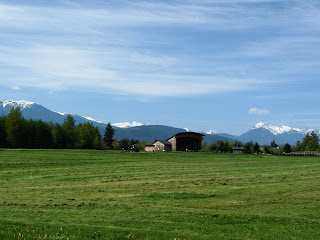
When looking for a nice Sequim vacation, 'Bell Hill View' vacation rental might just be what you are looking for. 'Bell Hill View' Sequim vacation rental home is a fully equipped 1Bd/1Ba located in a peaceful upscale Sequim setting, yet in walking distance to shopping, restaurants & park. Sequim Vacation Rental features top amenities like FREE wireless Internet access + long distance calls. For peace of mind, read a few Sequim guest reviews from our guest book.

2013 Sequim vacation rental rates
1Bd/1Ba Sequim Vacation Rental Monthly Rate (all-inclusive, sleeps 2)
2013 Low Season Rate (May - June) $850/mo.
2013 High Season Rate (July - August) $950/mo.
2013 Fall Rate (September - October) $900/mo.
2013 Fall Rate (September - October) $900/mo.
Sales tax is included. Sorry, no pets allowed.
Sequim Vacation Rental
‘Bell Hill View’ is a charming, affordable Sequim vacation rental in a peaceful setting in an upscale neighborhood of sunny Sequim with lots of amenities, in walking distance to shopping, restaurants and Carrie Blake Park. Sequim Aquatic Recreation Center SARC with Olympic size lap pool, Jacuzzi, sauna, fitness center and more is a short 5-minute drive away. Experience Sequim on the North Olympic Peninsula at your own Sequim vacation home, home away from home.
‘Bell Hill View’ in Sequim is the perfect vacation destination when hiking the Olympic National Park, sailing or boating at John Wayne Marina with Puget Sound and the Strait of Juan de Fuca, walking or biking the Olympic Discovery Trail, playing golf on Sequim golf courses, visiting the Dungeness Spit National Wildlife Refuge or spectacular hiking in Olympic National Park.

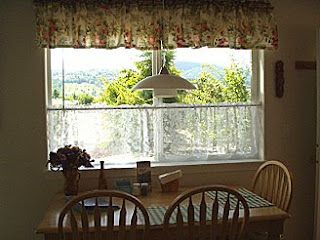
This Sequim Vacation Rental affords top privacy at your 1Bd/1Ba 525 sq ft vacation suite with beautiful views of Bell Hill and glimpses of the Olympic Mountains. For your utmost comfort, amenities include free wireless high speed Internet access for your laptop and free long distance Vonage phone, which is great for staying in touch with Sequim realtors or your home business.
‘Bell Hill View’ in Sequim is the perfect vacation destination when hiking the Olympic National Park, sailing or boating at John Wayne Marina with Puget Sound and the Strait of Juan de Fuca, walking or biking the Olympic Discovery Trail, playing golf on Sequim golf courses, visiting the Dungeness Spit National Wildlife Refuge or spectacular hiking in Olympic National Park.
This Sequim Vacation Rental affords top privacy at your 1Bd/1Ba 525 sq ft vacation suite with beautiful views of Bell Hill and glimpses of the Olympic Mountains. For your utmost comfort, amenities include free wireless high speed Internet access for your laptop and free long distance Vonage phone, which is great for staying in touch with Sequim realtors or your home business.
Choose from 90 cable channels, when relaxing on your recliner love seat after a day of adventure on the Olympic Peninsula or your search for a Sequim home to buy. Select comfort beds with dual control provide you with a restful sleep.

No need to fear that your dream vacation will become a budget nightmare. For less than the cost of the hotels, you can steal away to your own fully equipped, comfortable, private Sequim vacation rental only minutes away to the beauty and adventure of the North Olympic Peninsula with the Pacific Ocean and Olympic Mountains.
Get ready for your Sequim vacation on the Olympic Peninsula. Contact us today for your monthly stay with subject line ‘Sequim Vacation Home’. Looking forward to hearing from you. Greetings from Sequim
Sequim vacation rental amenities:
No need to fear that your dream vacation will become a budget nightmare. For less than the cost of the hotels, you can steal away to your own fully equipped, comfortable, private Sequim vacation rental only minutes away to the beauty and adventure of the North Olympic Peninsula with the Pacific Ocean and Olympic Mountains.
Get ready for your Sequim vacation on the Olympic Peninsula. Contact us today for your monthly stay with subject line ‘Sequim Vacation Home’. Looking forward to hearing from you. Greetings from Sequim
Sequim vacation rental amenities:
-Free high speed Internet for your laptop with wireless card
-Free local + long distance phone calls (US, Canada) with Vonage
-Free local + long distance phone calls (US, Canada) with Vonage
-HD TV with DVR for recording your favorite programs
-Over 100 cable channels + 45 music channels to choose from
-Over 100 cable channels + 45 music channels to choose from
-Select comfort bed with dual control
-Recliner love seat, Wall to Wall carpet in living room and bedroom
-Fully equipped kitchen w/fridge + deep freeze, microwave, stove
-Recliner love seat, Wall to Wall carpet in living room and bedroom
-Fully equipped kitchen w/fridge + deep freeze, microwave, stove
-A portable cooler + re-freezable ice packs for day trips
-Convenient, comfortable zone heating for colder months
-Convenient, comfortable zone heating for colder months
-Nice private outdoor garden sitting area for hot summer days
-Beautiful views of Bell Hill
-Downstairs apartment w/private entrance - no stairs to climb
-Off Street parking
- Washer/Dryer for your convenience on vacation
-Walking distance to Shopping + Carrie Blake Park
-Great central location, next to Carrie Blake Park, for exploring Sequim, John Wayne Marina, the Olympic Peninsula & Olympic National Park.
-Beautiful views of Bell Hill
-Downstairs apartment w/private entrance - no stairs to climb
-Off Street parking
- Washer/Dryer for your convenience on vacation
-Walking distance to Shopping + Carrie Blake Park
-Great central location, next to Carrie Blake Park, for exploring Sequim, John Wayne Marina, the Olympic Peninsula & Olympic National Park.
Note: This is a non-smoking apartment. No pets allowed.
***No extra cleaning fees charged!
Sequim Town Attractions
Sequim Aquatic Recreation Center SARC
***No extra cleaning fees charged!
Sequim Town Attractions
Sequim Aquatic Recreation Center SARC
Sequim Area Attractions
Hiking, Biking, Kayaking, Bird Watching, Swimming, Relaxing
Places to visit in the Sequim area and North Olympic Peninsula area:
Seattle, Port Angeles, Port Townsend, Gig Harbor, Ocean Shores, Whidbey Island, San Juan Islands, Columbia River Gorge, Hood Canal, Victoria BC, Vancouver Island
More Sequim Vacation Rental photos
More Sequim Vacation Rental photos


 Related Articles Sequim Vacation
Things to Do on Sequim Vacation
See Sequim Area photos
Tags: